Relationship Behaviours in D365 crm
You will see the relationship options. Select the My Order Line related entity, then enter required fields, some of which will default and you can overwrite:
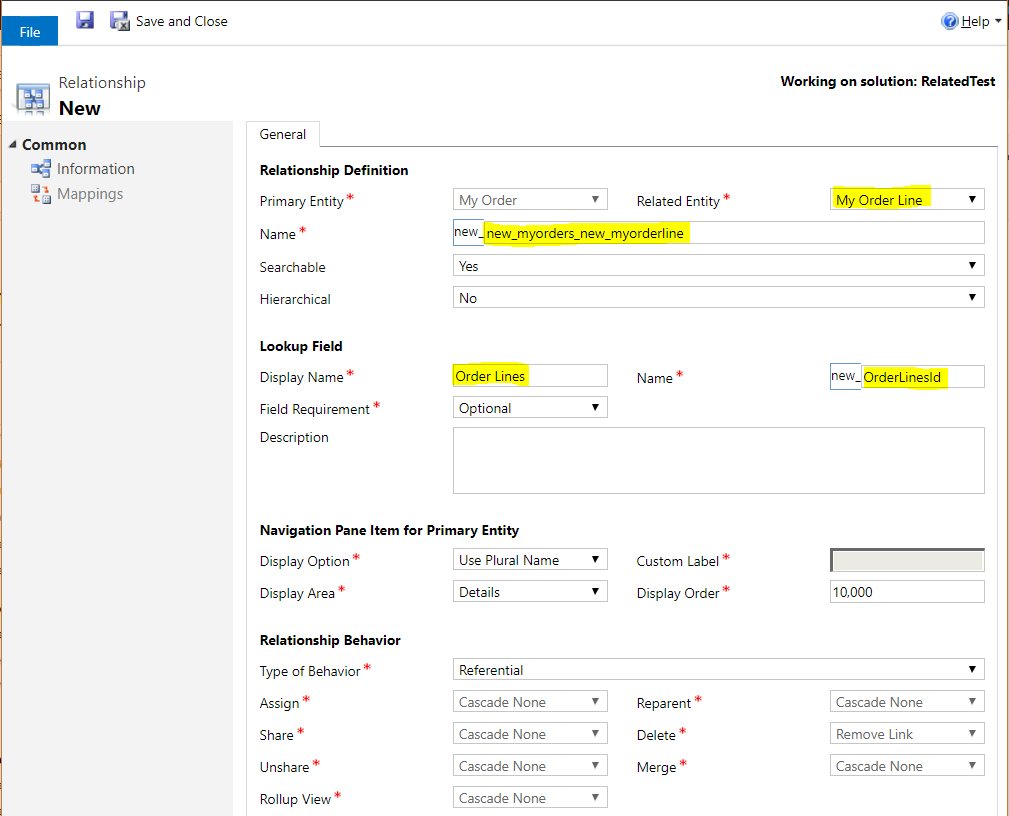
Note the Relationship Behavior section.
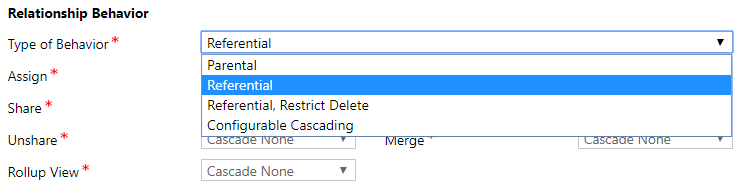
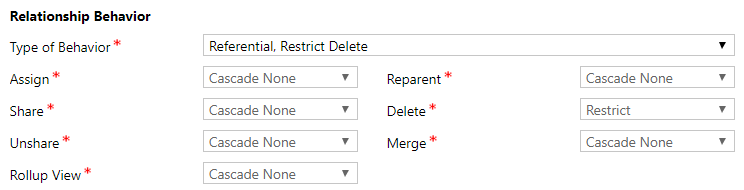
Selecting Parental, Referential or Referential, Restrict Delete will set the other fields to ready only and therefore non-configurable. Each behavior has pre-defined rules.
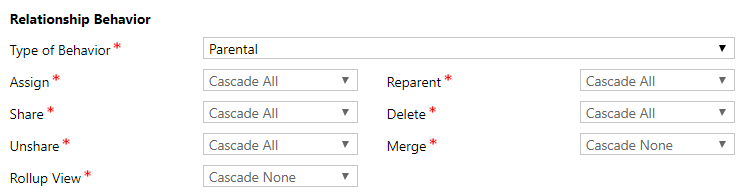
Note the options for Parental:
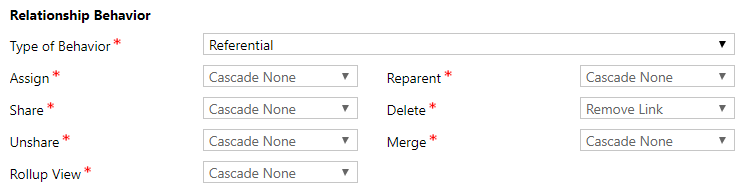
And Referential:
And Referential, Restrict Delete:
And Configure Cascading:
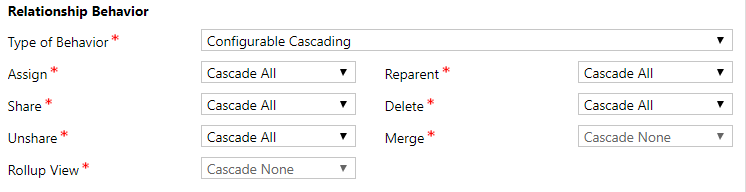
Selecting Configurable Cascading will allow you change the configuration of most of the options, including: Assign, Share, Unshare, Reparent and Delete. Which means, when the parent record is assigned, shared, unshared, reparented or deleted, the system will perform the set cascade rules you set.
Merge and Rollup View are still not configurable and are set to Cascade None:
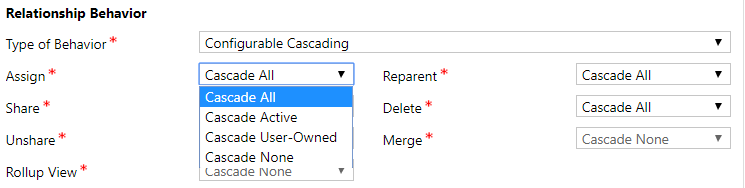
Note the options available depending on the action:
- Cascade All – this means the action is cascaded, i.e. if an action happens on the parent, do the same thing to the child records
- Cascade Active – if an action happens, perform it on active records
- Cascade User-Owned – perform the same action on records owned by the same user
- Cascade None – don’t do anything
For Delete, we have:
- Cascade All – perform same delete action on record
- Remove Link – remove link but don’t delete the record
- Restrict – do not allow deletion
For our example, we will set the behavior to “Referential” and publish the customizatio
Configurable cascading relationships in Dataverse (1:N) allow customized behavior for actions (Assign, Share, Unshare, Reparent, Delete, Merge) between tables. By choosing "Configurable Cascading," you can define specific rules like Cascade All, Cascade Active, Cascade User Owned, or Cascade None for each action.
Here’s a structured Configurable Cascading Actions Table for Dynamics 365 CRM. It shows how each parent record action can be configured to affect child records in a relationship:
📊 Configurable Cascading Actions in D365 CRM
| Parent Action | Cascade All | Cascade Active | Cascade User-Owned | Remove Link | Restrict |
|---|---|---|---|---|---|
| Assign | All child records are reassigned with the parent | Only active child records are reassigned | Only child records owned by the same user are reassigned | Child records remain linked but ownership unchanged | Prevents reassignment if child records exist |
| Share | Sharing parent also shares all child records | Only active child records are shared | Only child records owned by the same user are shared | Child records remain linked but not shared | Prevents sharing if child records exist |
| Unshare | Unsharing parent also unshares all child records | Only active child records are unshared | Only child records owned by the same user are unshared | Child records remain linked but sharing unchanged | Prevents unsharing if child records exist |
| Delete | Deleting parent deletes all child records | Only active child records are deleted | Only child records owned by the same user are deleted | Child records remain but link is removed | Prevents deletion if child records exist |
| Reparent | Child records move with parent when reparented | Only active child records move | Only child records owned by the same user move | Child records remain linked to old parent | Prevents reparenting if child records exist |
| Merge | Child records merge along with parent | Only active child records merge | Only child records owned by the same user merge | Child records remain linked but not merged | Prevents merge if child records exist |
This table is the core reference for configuring cascading behaviors in CRM relationships. It helps administrators decide whether child records should follow parent actions, remain independent, or block the parent action entirely.
Would you like me to also create a visual workflow example (like Accounts → Contacts) showing how each of these cascading rules plays out in practice? That way, you can see the impact more concretely.
- Cascade All: Applies the action to all related child rows.
- Cascade Active: Applies to related rows that are currently active.
- Cascade User Owned: Applies only to related rows owned by the same user as the parent.
- Cascade None: No action is taken on related rows.
- Restrict: Prevents the parent row from being deleted if child rows exist.
| Action | Description | Valid options |
|---|---|---|
| Assign | Change the referenced table record owner and/or business unit. | Active Cascade NoCascade UserOwned |
| Delete | Delete the referenced table record. Note: The options for this action are limited. | Cascade RemoveLink Restrict |
| Merge | Merge the record with another record. Note: For referenced tables that can be merged, Cascade is the only valid option. In other cases, use NoCascade. | Cascade NoCascade |
| Reparent | See About the reparent action later. | Active Cascade NoCascade UserOwned |
| Share | When the referenced table record is shared with another user. | Active Cascade NoCascade UserOwned |
| Unshare | When sharing is removed for the referenced table record. | Active Cascade NoCascade UserOwned |
Comments
Post a Comment